Stop Reconciling Rent by Hand: Open Banking for Irish Letting Agencies
Every letting agency knows the Monday-morning grind: open the bank, scroll through pages of transactions across several client accounts, and tick off which tenants have paid. It is slow, error-prone, and it scales badly — the more landlords you manage, the longer it takes. This guide explains how PSD2 Open Banking ends manual rent reconciliation, how TenantSync auto-matches each payment to the right tenancy, and how arrears surface the moment rent is late.
Why Manual Reconciliation Breaks at Agency Scale
For a single landlord with two properties, reconciling rent by hand is tedious but manageable. For an agency managing 80, 150 or 300 tenancies across dozens of landlord clients, the same task turns into a recurring, high-stakes bottleneck — and the failure modes multiply with every client you add.
The volume problem, multiplied by clients
A landlord app assumes one owner and a handful of tenancies. An agency has to reconcile rent per client, then multiply that by every tenancy under each client. Payments land in different accounts, on different days, under references that rarely say "rent, Unit 3A". By the time you've matched everything, half the week's gone.
References that don't identify the tenancy
Standing orders arrive as "TFR FROM J MURPHY" — and you may manage three Murphys. Rent paid through a third party carries the payer's name, not the property. Revolut transfers can carry almost no description at all. The signal-to-noise ratio in a busy client account is genuinely low, and a mistake here means a landlord is told their tenant is in arrears when they aren't (or the reverse).
Split payments, HAP and irregular schedules
Not every tenant pays one clean amount on the 1st. Some split rent into two transfers; some are on weekly cycles; and where a tenant is supported by Housing Assistance Payment (HAP), part of the rent arrives from the local authority and part from the tenant. A spreadsheet doesn't understand any of that — you do, line by line, every month.
The professional-liability angle
Rent records aren't just admin. They feed your landlord reports, your arrears decisions, and — through the tenancy — obligations tracked by the RTB and income figures your clients report to Revenue. A reconciliation error erodes the one thing an agency sells: trust that the money is handled correctly.
The real cost is hidden
The hours spent reconciling are visible on a timesheet. The cost of a late-caught arrears — an extra month before anyone notices rent stopped — usually isn't. Cutting the time-to-detect from weeks to days is where reconciliation automation pays for itself. (See our breakdown of the real cost of manual property management.)
PSD2 Open Banking, Explained for Letting Agents
Open Banking is the practical result of the EU's revised Payment Services Directive (PSD2). In plain terms, it gives you the legal right to let a regulated third party securely read your own bank account data — with your explicit consent — through your bank's official, secure channel. In Ireland this activity is overseen by the Central Bank of Ireland.
Three points matter most for an agency:
- It's read-only. The type of access used for reconciliation is account information access. It can read transactions and balances. It cannot move, withdraw or transfer money from the account.
- Your credentials stay with your bank. You approve access on your bank's own login/consent screen. TenantSync never sees or stores your online-banking username or password.
- Consent is yours to give and revoke. Access is time-limited by the bank and can be withdrawn at any time, on the bank's side or in-app.
This is the same regulated framework behind budgeting apps and accounting tools you may already use — applied specifically to the job of matching rent to tenancies.
Open Banking is not screen-scraping
Legitimate Open Banking never asks you to hand your banking password to a third party. If any tool asks for your online-banking login directly rather than redirecting you to your bank, that is not PSD2 Open Banking — walk away.
🏦 See rent match itself to the right tenant
Connect an AIB, Bank of Ireland, PTSB, EBS, Revolut or N26 account in a 14-day free trial and watch this month's rent reconcile automatically across your client tenancies.
How Rent Auto-Matches to the Right Tenancy
Once an account is connected, TenantSync pulls in transactions and keeps syncing new ones in the background. For each incoming credit, the reconciliation engine scores it against your active tenancies and their open invoices, looking at several signals at once — not just the amount.
| Signal | What it looks at | Why it matters for agencies |
|---|---|---|
| Amount | The credit against the lease rent and any open invoice's outstanding balance. | Separates a €1,400 rent credit from a €40 refund at a glance. |
| Payer name | The counterparty on the transfer against the tenants on the lease. | Distinguishes between two tenants with similar surnames. |
| Reference & property | Remittance text, invoice numbers, unit or property identifiers. | A reference like a unit name or invoice number is a near-certain match. |
| Recurring pattern | Whether a similar amount recurs monthly on a similar date. | Confirms genuine rent versus a one-off transfer of the same value. |
| Due-date window | How close the payment is to the invoice/lease due date. | Ties the payment to the correct billing period. |
| HAP & part payments | Credits from a local authority and partial amounts toward a month. | Handles HAP-supported tenancies and split rent correctly. |
When the best-matching tenancy is a clear, high-confidence winner, TenantSync matches the payment automatically: it ties the transaction to the tenancy and invoice, creates the invoice if one doesn't exist yet for that period, and posts the payment to the tenant's ledger. No typing, no spreadsheet row.
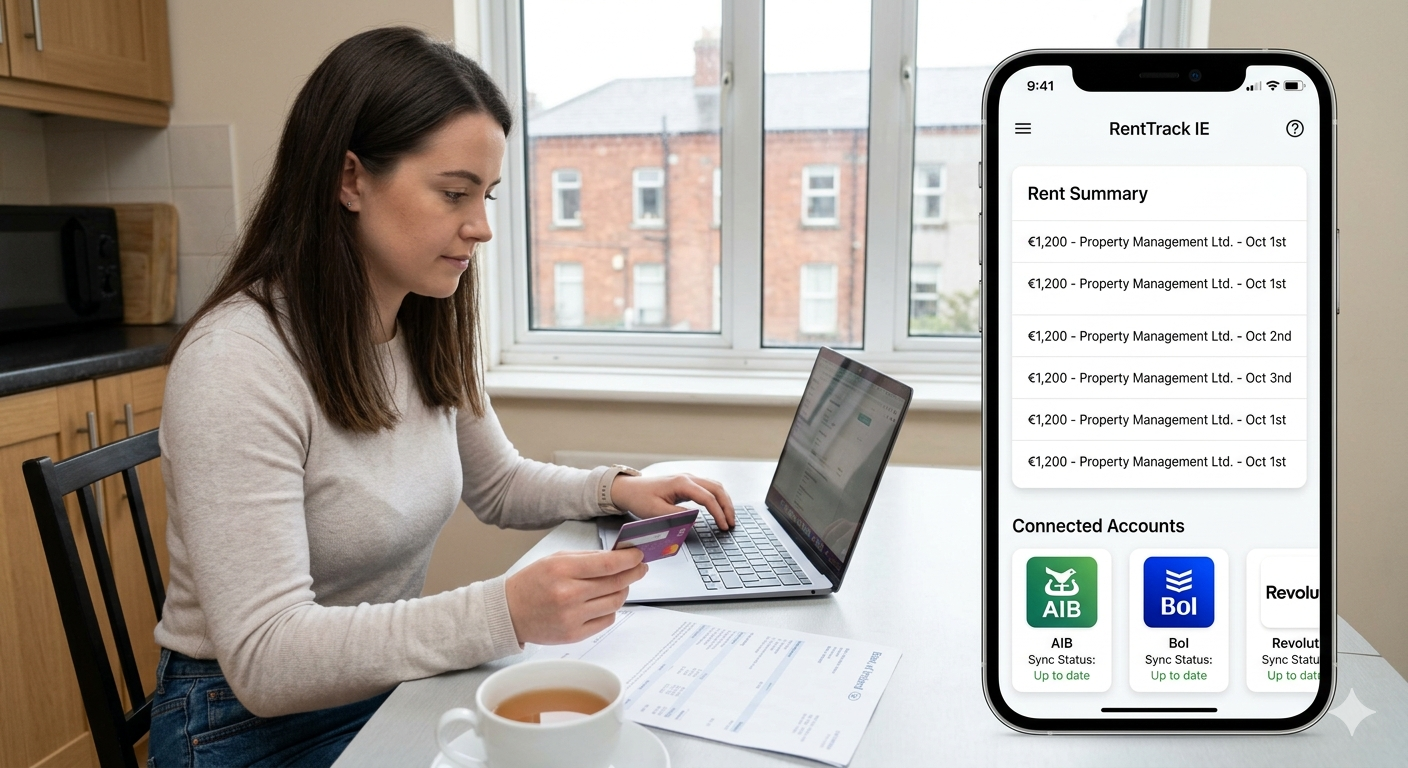
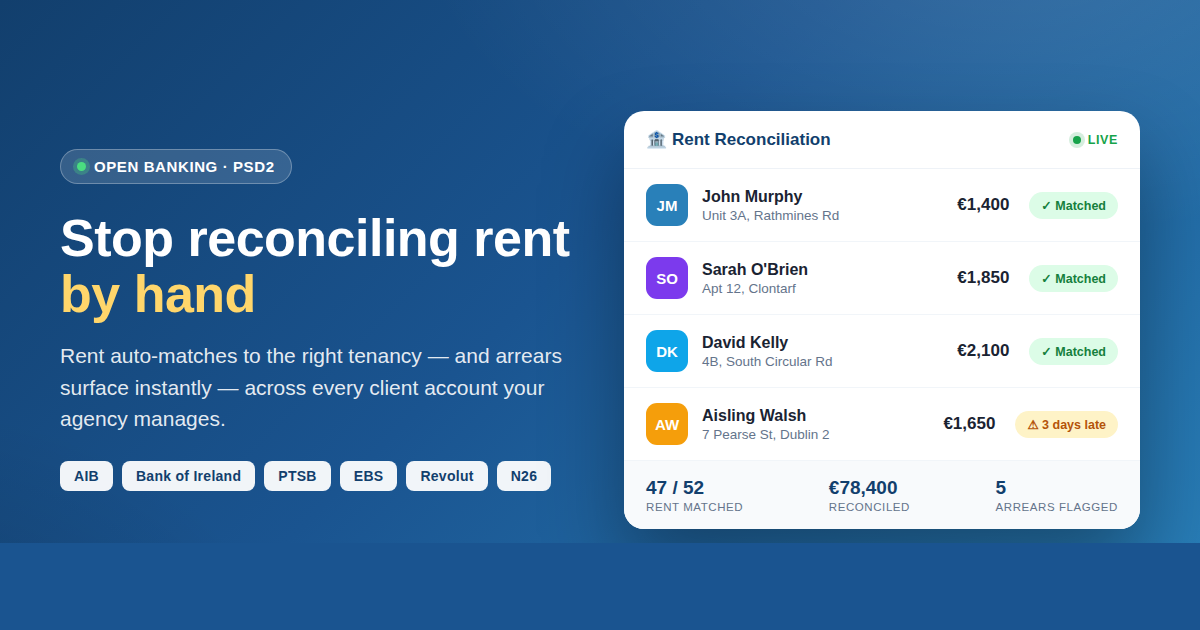
Illustrative reconciliation feed
A typical live view looks like this (example figures for illustration only):
- John Murphy — Unit 3A, Rathmines Rd — €1,400 · ✓ Matched
- Sarah O'Brien — Apt 12, Clontarf — €1,850 · ✓ Matched
- David Kelly — 4B, South Circular Rd — €2,100 · ✓ Matched
- Aisling Walsh — 7 Pearse St — €1,650 · ⚠ 3 days late
The Review Queue: Nothing Gets Silently Mis-Posted
Automation is only trustworthy if it knows when not to guess. When a payment is genuinely ambiguous — a generic "Transfer" reference, an unexpected amount, two plausible tenancies — TenantSync doesn't force a match. It places the transaction in a review queue with the most likely tenancy candidates and the specific reasons behind each suggestion.
From there, an agency staff member can:
- See the shortlist of candidate tenancies, each with its matching reasons (amount, payer, reference, timing);
- Confirm the correct tenancy in one click — the payment posts to that tenant's ledger and the invoice updates;
- Reject it if it isn't rent at all, so it won't clutter future views.
This is the difference between "AI that guesses" and a workflow you can stand over with a client: confident matches are automatic, uncertain ones are surfaced clearly, and a human makes the final call on the edge cases — with the reasoning laid out, not hidden.
💡 Fewer edge cases over time
If a specific tenant's payments keep landing in the review queue, it's usually because their reference is generic. A quick note to the landlord or tenant to add the unit or an invoice reference to their standing order turns those into automatic matches from then on.
Instant Arrears Visibility Across the Portfolio
Reconciliation isn't only about the rent that arrived — it's about spotting the rent that didn't. Because TenantSync knows what each tenancy owes and what has actually been matched from the bank, it can surface arrears without you hunting for them.
The arrears workflow is built for a book of business, not a single landlord:
- Bank-confirmed arrears. When a tenancy's rent is past due with no matched payment (after a short grace period), it's raised as an arrears item — grounded in real bank data, not just a missed reminder.
- No false alarms. If a payment for that period is sitting in the review queue, arrears are held back until it's resolved — so a landlord is never told a paying tenant is behind.
- Per-landlord summaries. Arrears are grouped by owner, so each landlord client can receive a single, clean summary rather than scattered alerts.
For the agency principal, that means walking into a client review already knowing exactly which tenancies are current and which need a conversation — before the landlord asks.
Beyond Matching: Disbursements, Fees and Client Trust
Matching rent is the start. What makes Open Banking genuinely valuable to an agency is what happens next — the client-money workflow that sits on top of clean, reconciled data.
- Per-client (landlord) reporting. Because every payment is tied to a tenancy and owner, income-versus-expected and arrears roll up per landlord automatically — the reports that renew management contracts. (See what agencies need that landlord apps lack.)
- Management-fee handling. Your management fee can be calculated against reconciled rent, so the number in the landlord's statement reflects what actually came in.
- Landlord disbursements. Reconciled rent, net of fees and agreed costs, flows into clear disbursement statements per landlord — the paper trail clients expect from a professional agency.
- Bank-fed expenses. Outgoing costs picked up from the same feed can be categorised and attributed to the right property, keeping each client's picture complete.
The through-line is trust. An agency that can show a landlord exactly what was received, when, from whom, and what was paid out — all traceable to the bank — is an agency that's hard to leave.
📊 Turn reconciled rent into client-ready reports
See auto-matching, the review queue, arrears and per-landlord disbursements on data shaped like your own portfolio.
How to Connect a Bank — Step by Step
Open the reconciliation area
In TenantSync, go to Open Banking and choose to connect a bank account — for the agency or a specific client account.
Select your bank
Pick your institution from the supported Irish banks: AIB, Bank of Ireland, PTSB, EBS, Revolut or N26.
Authorise read-only access
You're redirected to your bank's own secure login and consent screen. Approve read-only access to account information. Your banking credentials never touch TenantSync.
Let transactions sync
TenantSync imports recent transactions and then keeps syncing new ones automatically in the background — no manual exports.
Review auto-matched rent
Confident matches are posted to each tenant's ledger automatically. Open the reconciliation dashboard to see the month's matched payments and totals.
Clear the review queue & act on arrears
Confirm or reject any ambiguous payments in one click, then use the arrears view to see which tenancies are behind and send per-landlord summaries.
Not ready to connect a live account?
You can try the mechanics first with our free Bank Statement Rent Processor — upload a CSV to see rent transactions identified — then move to fully automated Open Banking when you're ready.
Security, Consent and GDPR
Handling client money means security isn't a nice-to-have. Open Banking is designed around exactly this concern:
- Read-only by design. Account-information access can read transactions and balances only. It cannot initiate payments or move funds.
- No stored credentials. Authentication happens on your bank's side; TenantSync holds a scoped, revocable access token, never your login.
- Time-limited consent. Access expires on the bank's schedule and re-consent is required to continue — you're never signing an open-ended blank cheque.
- Revoke any time. You can withdraw consent through your bank or by disconnecting the account in-app.
- GDPR. As an Irish-built platform, TenantSync processes personal and financial data under the GDPR. Always keep your own client-consent and data-handling practices aligned with your obligations.
For agencies, the practical upshot is a cleaner audit position than emailing spreadsheets around: a single, permissioned, revocable connection instead of exported statements living in inboxes.
Frequently Asked Questions
What is Open Banking rent reconciliation?
It uses the PSD2 framework to securely read incoming transactions from a connected bank account and automatically match each rent payment to the correct tenancy and invoice. Instead of scanning a statement line by line, you see payments matched, flagged for review, or surfaced as arrears — without manual data entry.
Which Irish banks does TenantSync support?
TenantSync connects via PSD2 Open Banking to AIB, Bank of Ireland, permanent tsb (PTSB), EBS, Revolut and N26. You can connect more than one account — which is exactly what agencies running multiple client or pooled accounts need.
Is it safe? Can TenantSync move my money?
The access used for reconciliation is read-only account information. You authorise it through your own bank's secure login and consent screen — TenantSync never sees or stores your banking credentials, and the connection cannot move, withdraw or transfer money. Consent is time-limited and revocable at any time.
What happens when a payment can't be matched automatically?
Confident matches post automatically. Anything ambiguous — a generic reference, a split payment, an unexpected amount — goes to a review queue with suggested tenancy candidates and the reasons behind each. You confirm or reject in one click, and nothing is silently mis-posted.
Does it handle HAP and part payments?
Yes. Reconciliation recognises payments arriving from a local authority (such as HAP credits) and partial payments that make up a full month's rent, rather than assuming every rent payment is a single round transfer from the tenant.
How is this different from the free Bank Statement Rent Processor?
The free Bank Statement Rent Processor is a one-off manual check — export a CSV and upload it each time. Open Banking reconciliation runs continuously: it syncs new transactions automatically, matches them to the right tenancy, keeps each tenant's ledger current, and raises arrears with no CSV uploads.
Summary
- Manual reconciliation doesn't just get slower at agency scale — it gets riskier, because errors erode the client trust an agency sells.
- PSD2 Open Banking gives read-only, consent-based, revocable access to bank data — no stored credentials and no ability to move money.
- TenantSync auto-matches rent to the right tenancy using amount, payer, reference, recurrence, timing and HAP/part-payment signals — and routes anything uncertain to a clear review queue.
- Arrears are surfaced from real bank data, grouped per landlord, with false alarms held back while a payment is under review.
- Reconciled data powers the agency layer: management fees, landlord disbursements and per-client reports that renew contracts.
- Supported banks: AIB, Bank of Ireland, PTSB, EBS, Revolut and N26. Start with a 14-day free trial.
🏠 Give your Monday mornings back
Connect a bank in a free trial and let rent reconcile itself — matched to the right tenancy, arrears surfaced, per-landlord reports ready. No CSVs. No credit card to start.
Related Articles